Drag

Collection

000

Last added X Days Ago

Take a peek inside our ever-growing collection of resources. We’ve added 000 resources since we launched.

X days ago
New

Dropping Cards Stack

Sliders & Marquees
Dropping Cards Stack
X days ago
New

Expanding Feature Pills

Sections & Layouts
Expanding Feature Pills
New

Rotating Image Trail

Cursor Animations
Rotating Image Trail
New

Variable Font Weight Hover

Hover Interactions
Variable Font Weight Hover
New

Image to Background (Zoom)

Scroll Animations
Image to Background (Zoom)
New

Image Sequence on Scroll

Video & Audio
Image Sequence on Scroll
New

Tooltip (CSS Only)

Dropdowns & Information
Tooltip (CSS Only)
New

Draggable Marquee (Directional)

Sliders & Marquees
Draggable Marquee (Directional)
New

Radial Text Marquee

Sliders & Marquees
Radial Text Marquee
New

Snowflake Effect

Gimmicks
Snowflake Effect
New

Big Typo Scroll Preview (Infinite)

Scroll Animations
Big Typo Scroll Preview (Infinite)
New

Rotating Text

Sections & Layouts
Rotating Text
New

Stacking Image Trail

Cursor Animations
Stacking Image Trail
New

Draw Path on Scroll

Scroll Animations
Draw Path on Scroll
New

Live Search (List.js)

Filters & Sorting
Live Search (List.js)
New

Overlapping Slider

Sliders & Marquees
Overlapping Slider
New

Willem Loading Animation

Loaders
Willem Loading Animation
New

Download Button

Utilities & Scripts
Download Button
New

Crisp Loading Animation

Loaders
Crisp Loading Animation
New

Refracted Glass (Unicorn Studio)

Gallery & Images
Refracted Glass (Unicorn Studio)
New

Bold Full Screen Navigation

Navigation
Bold Full Screen Navigation
New

Cursor Coordinates

Cursor Animations
Cursor Coordinates
New

Elastic Pulse Button (Bouncy)

Buttons
Elastic Pulse Button (Bouncy)
New

Horizontal Scrolling Sections

Scroll Animations
Horizontal Scrolling Sections
New

Opening Hours (Timetable)

Utilities & Scripts
Opening Hours (Timetable)
New

3D Perspective Hover

Hover Interactions
3D Perspective Hover
New

Footer Parallax Effect

Sections & Layouts
Footer Parallax Effect
New

Layout Grid Flip

Sections & Layouts
Layout Grid Flip
New

Social Share Buttons

Utilities & Scripts
Social Share Buttons
New

Swiper Slider Setup

Sliders & Marquees
Swiper Slider Setup
New

Countdown

Utilities & Scripts
Countdown
New

Magnetic Cursor

Cursor Animations
Magnetic Cursor
New

Custom Bunny HLS Lightbox (Advanced)

Video & Audio
Custom Bunny HLS Lightbox (Advanced)
New

Bunny HLS Background Video

Video & Audio
Bunny HLS Background Video
New

Custom Bunny HLS Player (Basic)

Video & Audio
Custom Bunny HLS Player (Basic)
New

Logo Reveal Loader

Loaders
Logo Reveal Loader
New

Custom Bunny HLS Player (Advanced)

Video & Audio
Custom Bunny HLS Player (Advanced)
New

Sticky Features

Scroll Animations
Sticky Features
New

Accelerating Globe on Scroll

Gimmicks
Accelerating Globe on Scroll
New

Button with Slanted Reveal

Buttons
Button with Slanted Reveal
New

Cursor with Marquee Effect

Cursor Animations
Cursor with Marquee Effect
New

Stacking Cards Parallax

Scroll Animations
Stacking Cards Parallax
New

Multi Filter Setup (Multi Match)

Filters & Sorting
Multi Filter Setup (Multi Match)
New

Basic Filter Setup (Multi Match)

Filters & Sorting
Basic Filter Setup (Multi Match)
New

Elements Reveal on Scroll

Scroll Animations
Elements Reveal on Scroll
New

Pixelate Image Render Effect

Gallery & Images
Pixelate Image Render Effect
New

3D Image Carousel

Sliders & Marquees
3D Image Carousel
New

Directional List Hover

Hover Interactions
Directional List Hover
New

Image Preview Cursor Follower

Cursor Animations
Image Preview Cursor Follower
New

Logo Wall Cycle

Sections & Layouts
Logo Wall Cycle
New

Masonry Grid

Sections & Layouts
Masonry Grid
New

Flick Cards Slider

Sliders & Marquees
Flick Cards Slider
New

Back To Top Button

Utilities & Scripts
Back To Top Button
New

Face Follow Cursor (Mascot)

Gimmicks
Face Follow Cursor (Mascot)
New

Multilevel Navigation

Navigation
Multilevel Navigation
New

Momentum Based Hover (Inertia)

Hover Interactions
Momentum Based Hover (Inertia)
New

Tilting Bouncing Button

Buttons
Tilting Bouncing Button
New

Basic GSAP Slider (Watch CSS)

Sliders & Marquees
Basic GSAP Slider (Watch CSS)
New

Follow SVG Path on Scroll

Scroll Animations
Follow SVG Path on Scroll
New

Locomotive Smooth Scroll Setup

Scroll Animations
Locomotive Smooth Scroll Setup
New

Lottie Setup

Utilities & Scripts
Lottie Setup
New

Custom Cursor (CSS)

Cursor Animations
Custom Cursor (CSS)
New

Play Video on Hover (Lazy)

Video & Audio
Play Video on Hover (Lazy)
New

WhatsApp Modal (Generate QR Code)

Dropdowns & Information
WhatsApp Modal (Generate QR Code)
New

Stacked Cards Slider

Sliders & Marquees
Stacked Cards Slider
New

Global Parallax Setup

Scroll Animations
Global Parallax Setup
New

Falling Text with Gravity

Gimmicks
Falling Text with Gravity
New

Highlight Text on Scroll

Scroll Animations
Highlight Text on Scroll
New

Draw Random Underline

Buttons
Draw Random Underline
New

Welcoming Words Loader

Loaders
Welcoming Words Loader
New

404 Error Minigame

Gimmicks
404 Error Minigame
New

Masked Text Reveal (GSAP SplitText)

Scroll Animations
Masked Text Reveal (GSAP SplitText)
New

Glowing Interactive Dots Grid

Hover Interactions
Glowing Interactive Dots Grid
New

Javascript Toggle (Attributes)

Utilities & Scripts
Javascript Toggle (Attributes)
New

Centered Scaling Navigation Bar

Navigation
Centered Scaling Navigation Bar
New

Display Count

Utilities & Scripts
Display Count
New

Draggable Stickers

Gimmicks
Draggable Stickers
New

Custom Vimeo Lightbox (Advanced)

Video & Audio
Custom Vimeo Lightbox (Advanced)
New

Sticky Title Scroll Effect

Scroll Animations
Sticky Title Scroll Effect
New

Scaling Element on Scroll (GSAP Flip)

Scroll Animations
Scaling Element on Scroll (GSAP Flip)
New

Copy Email to Clipboard Button

Buttons
Copy Email to Clipboard Button
New

Falling 2D Objects (MatterJS)

Gimmicks
Falling 2D Objects (MatterJS)
New

Centered Looping Slider

Sliders & Marquees
Centered Looping Slider
New

One-page Progress Navigation

Navigation
One-page Progress Navigation
New

Button with Rotating Icon

Buttons
Button with Rotating Icon
New

Parallax Image Gallery with Thumbnails

Gallery & Images
Parallax Image Gallery with Thumbnails
New

Scaling Hamburger Navigation

Navigation
Scaling Hamburger Navigation
New

Before/After Split Slider

Gallery & Images
Before/After Split Slider
New

Play/Pause Video on Scroll

Video & Audio
Play/Pause Video on Scroll
New

Skeleton Loader Text

Scroll Animations
Skeleton Loader Text
New

Flickity Slider Setup (Watch CSS)

Sliders & Marquees
Flickity Slider Setup (Watch CSS)
New

Interactive Pixel Grid

Hover Interactions
Interactive Pixel Grid
New

CSS Marquee

Sliders & Marquees
CSS Marquee
New

Velocity Based Custom Cursor

Cursor Animations
Velocity Based Custom Cursor
New

Stop Motion Button (CSS Steps)

Buttons
Stop Motion Button (CSS Steps)
New

Dark/Light Mode with Cookie

Utilities & Scripts
Dark/Light Mode with Cookie
New

Lightbox Setup

Gallery & Images
Lightbox Setup
New

Audio Player (with Howler.js)

Video & Audio
Audio Player (with Howler.js)
New

Auto Image Cycle (Slideshow)

Gallery & Images
Auto Image Cycle (Slideshow)
New

Text Scramble (Load, Scroll, Hover)

Utilities & Scripts
Text Scramble (Load, Scroll, Hover)
New

Image Trail Following Cursor

Cursor Animations
Image Trail Following Cursor
New

Basic Filter Setup

Filters & Sorting
Basic Filter Setup
New

Sticky Section Tabs (CSS Only)

Dropdowns & Information
Sticky Section Tabs (CSS Only)
New

Change Page Title on Leave

Gimmicks
Change Page Title on Leave
New

Vimeo Background Video

Video & Audio
Vimeo Background Video
New

Tab System with Autoplay Option

Sections & Layouts
Tab System with Autoplay Option
New

Button with CSS Character Stagger

Buttons
Button with CSS Character Stagger
New

Basic Modal Setup

Dropdowns & Information
Basic Modal Setup
New

Toggle (CSS Only Trick)

Buttons
Toggle (CSS Only Trick)
New

Live Form Validation (Advanced)

Forms
Live Form Validation (Advanced)
New

Check Section Theme on Scroll

Utilities & Scripts
Check Section Theme on Scroll
New

Burger Menu Button

Buttons
Burger Menu Button
New

Draw On Element with Cursor

Cursor Animations
Draw On Element with Cursor
New

Custom Vimeo Player (Basic)

Video & Audio
Custom Vimeo Player (Basic)
New

Custom Vimeo Player (Advanced)

Video & Audio
Custom Vimeo Player (Advanced)
New

Accordion CSS Animation

Dropdowns & Information
Accordion CSS Animation
New

Marquee with Scroll Direction

Sliders & Marquees
Marquee with Scroll Direction
New

Detect Scrolling Direction (Up/Down)

Utilities & Scripts
Detect Scrolling Direction (Up/Down)
New

Magnetic Hover Effect

Buttons
Magnetic Hover Effect
New

Lenis Scroll-To Anchor Target

Utilities & Scripts
Lenis Scroll-To Anchor Target
New

Lenis Smooth Scroll Setup

Utilities & Scripts
Lenis Smooth Scroll Setup
New

Mouse Cursor Confetti (GSAP Physics2D)

Gimmicks
Mouse Cursor Confetti (GSAP Physics2D)
New

Dynamic Current Time

Utilities & Scripts
Dynamic Current Time
New

Morphing Play/Pause (GSAP MorphSVG)

Buttons
Morphing Play/Pause (GSAP MorphSVG)
New

Scroll Progress Number

Scroll Animations
Scroll Progress Number
New

Scroll Progress Bar

Scroll Animations
Scroll Progress Bar
New

Emoji Rain Effect

Gimmicks
Emoji Rain Effect
New

Basic Custom Cursor

Cursor Animations
Basic Custom Cursor
New

Directional Button Hover

Buttons
Directional Button Hover
New

Number Loader in 3 Steps

Loaders
Number Loader in 3 Steps
New

Button with Bubble Arrow

Buttons
Button with Bubble Arrow
New

Underline Link Animation

Buttons
Underline Link Animation
New

Live Form Validation (Basic)

Forms
Live Form Validation (Basic)
New

Pixelated Page Transition

Page Transitions
Pixelated Page Transition
New

Expiring New Badge/Label

Utilities & Scripts
Expiring New Badge/Label
New

Draggable Infinite Slider (GSAP Draggable)

Sliders & Marquees
Draggable Infinite Slider (GSAP Draggable)
New

Side Navigation with Wipe Effect

Navigation
Side Navigation with Wipe Effect
New

Dynamic Custom Text Cursor (Edge Aware)

Cursor Animations
Dynamic Custom Text Cursor (Edge Aware)
New

Osmo Scaling System

Utilities & Scripts
Osmo Scaling System
New

Dynamic Current Year

Utilities & Scripts
Dynamic Current Year
New

Parallax Image Layers

Scroll Animations
Parallax Image Layers
New

Apple Dock Navigation Bar

Navigation
Apple Dock Navigation Bar
New

Looping Words with Selector

Sections & Layouts
Looping Words with Selector
New

Pixelated Image Reveal

Hover Interactions
Pixelated Image Reveal
Try for free

Want a taste before you buy?

Try the Osmo Demo Vault

Try 20 Resources for Free

Got questions?
We’ve got answers.

We even answered
without ChatGPT ;)

What is the Vault?

The Vault is where all Osmo resources live. It’s basically our platform, the heart of our product.

You’ll find a mix of functional and creative resources: components, snippets, effects, and techniques built for designers and developers who love detail.

Everything comes with clear documentation for both Webflow and HTML/CSS/JS. We use the best tools available on the web, like GSAP, so you can easily learn, copy, or adapt them into your own projects.

Can I still use the vault resources when I cancel my membership?

Yes. Anything you already used in shipped projects stays fine to use. Your Vault access and updates stop when your billing period ends. We will not lock you into some CDN of ours to keep access!

How often are new resources added?

Very regularly. Check the Updates page for an always up-to-date list of what’s new and what changed!

Do the resources come with documentation and video tutorials?

Yes. Every resource comes with two types of documentation, one for Webflow and one for HTML/CSS/JS.

Some resources also include short video tutorials that walk you through the setup and logic behind them. On top of that, we regularly create extra video content that goes beyond individual resources, covering broader topics.

Can I modify or customize the resources to fit my projects?

Yes, absolutely. That’s one of the strongest things about Osmo: We give you the direct code. Nothing’s hidden.

You can change structure, timing, easing, or styling however you like. Every resource is made to be customized, so you can make it fit perfectly with your own workflow and design style.

Can I request specific resources?

Absolutely. We love hearing ideas from our community! That’s why we highly recommend joining our Slack Community. It’s a global space for designers and creative developers, with dedicated channels for feedback, discussions, and submitting new resource ideas.

Can I use the Vault Resources in client projects?

Yes, absolutely. Use them in personal and client work. What you can’t do is resell or redistribute the resources as a library or product.

Will my saved resources stay synced across devices?

Yes. Saves and favorites are tied to your account, so they show up wherever you sign in. If something looks out of date, try refreshing your dashboard.

Who is creating the Osmo Resources?

Mostly Dennis Snellenberg and Ilja van Eck, with select collaborators. We ship the same quality we use in real projects, or even better.

How do I get notified when new resources are added?

Join Slack for announcements, check the Updates page, and keep an eye on email. We share releases and improvements across those channels.

Can I share the Osmo Vault with my co-worker or friend?

No, not unless you’re on a team account. Regular Osmo accounts are single-user.

If we suspect account sharing or other misuse, we reserve the right to temporarily disable access until the situation is cleared up.

Who is Osmo made for?

Osmo is made for designers and developers who care about detail, the ones who love smooth interactions, creative layouts, and sites that stand out.

It’s built for creative web developers who want to enhance their skills, streamline their workflow, and create award-worthy projects. Whether you’re freelancing, part of an agency, or working on personal projects, Osmo has something for you.

Are you Webflow exclusive, or do you give the HTML/CSS as well?

We’re not Webflow exclusive. Every resource in Osmo comes with full HTML/CSS & JS documentation, so you can easily adapt it to your workflow. Osmo is built for creative developers, whether you use Webflow, write code from scratch, or work somewhere in between.

Who is behind Osmo?

Osmo was created by Dennis Snellenberg and Ilja van Eck.

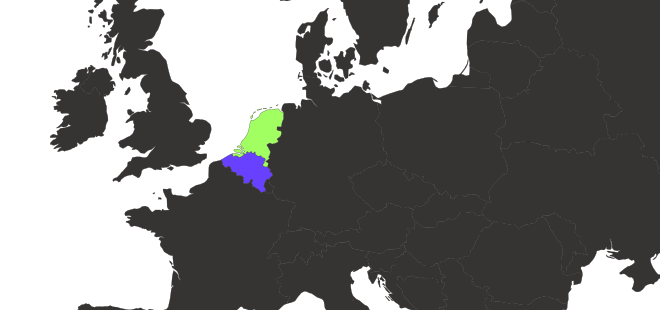
Based in the Netherlands and Belgium, we’ve combined our experience from years of building high-end websites and over 35 Awwwards “Site of the Day” wins into a platform that helps others create interactive, animated, one-of-a-kind projects.

How often do you add new content?

We update Osmo very regularly. You can always check our Updates page to see everything we’ve added recently. New components, resources, and improvements are rolled out consistently to keep things fresh.

Can I suggest a resource for Osmo to create?

Absolutely. We love hearing ideas from our community! That’s why we highly recommend joining our Slack Community. It’s a global space for designers and creative developers, with dedicated channels for feedback, discussions, and submitting new resource ideas.

Is there a free trial or demo version I can explore first?

Yes!

We have a free demo that currently includes 20 resources from the Vault. You can explore them right away and get a feel for how Osmo works. Sign up here to try it out.

Can I still use the resources when I cancel my membership?

Yes. When you cancel, you keep access until the end of your current billing period. After that, your vault access stops, but anything you already used in shipped projects is fine to keep using. Redistribution or reselling is not allowed.

Do you have a team, studio or agency plan?

We do indeed! Head to the pricing page, and use the toggle above the pricing cards to switch to the team plan.

Is there a refund policy for purchases?

Yes, we offer refunds under certain conditions. If you’re unsatisfied or have an issue with a purchase, reach out to us, and we’ll work with you to find a resolution.

Can I change my plan later?

Yes, you can switch between quarterly and yearly billing options at any time through your account settings in the dashboard. If you decide to upgrade to the lifetime plan, the price will reflect the current offering at the time of your upgrade.
How can I contact support if I have an issue?

Email us or reach out in Slack. We’re active and try to help quickly, and the community is great for troubleshooting too. If you run into a bug, there's usually lots of people ready to help out.

Can I share my Osmo account with my co-worker or friend?

No, not unless you’re on a team account. Regular Osmo accounts are single-user.

If we suspect account sharing or other misuse, we reserve the right to temporarily disable access until the situation is cleared up.

We'll see you there!

Built
to Flex
Built
to Flex

Built
to Flex
Built
to Flex

Victor Work
Jordan Gilory
Jason Harvey
Huy Nguyen

Join 1.7K+ others

Ready to
level up?

Become a member to unlock the full Osmo toolkit today.