




























































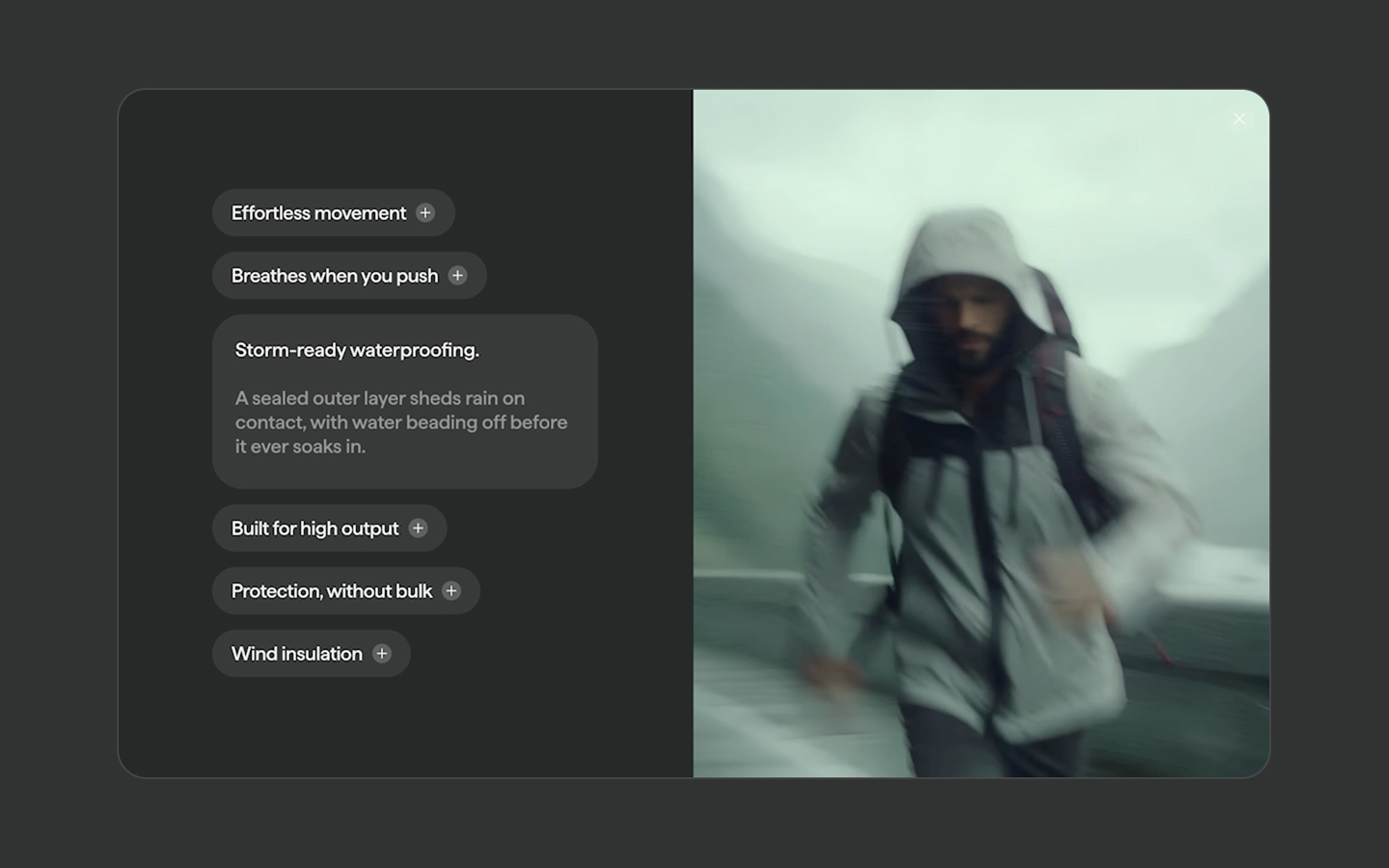
Expanding Feature Pills
Documentation
Webflow
Code
Setup: External Scripts
External Scripts in Webflow
Make sure to always put the External Scripts before the Javascript step of the resource.
In this video you learn where to put these in your Webflow project? Or how to include a paid GSAP Club plugin in your project?
HTML
<script src="https://cdn.jsdelivr.net/npm/gsap@3.14.1/dist/gsap.min.js"></script>Step 1: Copy structure to Webflow
Copy structure to Webflow
In the video below we described how you can copy + paste the structure of this resource to your Webflow project.
Copy to Webflow
Webflow structure is not required for this resource.
Step 1: Add HTML
HTML
<div data-feature-pills-active="false" aria-label="product features" data-feature-pills-init="" data-edit-mode="false" class="feature-pills__wrap">
  <div class="feature-pills__layout">
    <div class="feature-pills__col">
      <div data-feature-pills-collection="" class="feature-pills__info-collection">
        <ul role="list" data-feature-pills-list="" class="feature-pills__info-list">
          <li data-feature-pills-item="" data-active="false" class="feature-pills__info-item">
            <div class="feature-pills__item-bg"></div>
            <button data-feature-pills-button="" aria-expanded="false" class="feature-pills__item-button">
              <span class="feature-pills__item-label">Effortless movement</span>
              <span class="feature-pills__item-icon">
                <span class="feature-pills__item-icon-bar"></span>
                <span class="feature-pills__item-icon-bar is--horizontal"></span>
              </span>
            </button>
            <div aria-hidden="true" data-feature-pills-content="" class="feature-pills__item-content">
              <div class="feature-pills__item-mask">
                <div data-feature-pills-inner="" class="feature-pills__item-inner">
                  <p class="feature-pills__item-body">Effortless movement.<br><br>
                    <span class="feature-pills__item-body-span">Four-way stretch and a tuned cut move with you — so every stride, reach, and turn feels natural.</span>
                  </p>
                </div>
              </div>
            </div>
          </li>
          <li data-feature-pills-item="" data-active="false" class="feature-pills__info-item">
            <div class="feature-pills__item-bg"></div><button data-feature-pills-button="" aria-expanded="false" class="feature-pills__item-button"><span class="feature-pills__item-label">Breathes when you push</span><span class="feature-pills__item-icon"><span class="feature-pills__item-icon-bar"></span><span class="feature-pills__item-icon-bar is--horizontal"></span></span></button>
            <div aria-hidden="true" data-feature-pills-content="" class="feature-pills__item-content">
              <div class="feature-pills__item-mask">
                <div data-feature-pills-inner="" class="feature-pills__item-inner">
                  <p class="feature-pills__item-body">Breathes when you push.<br><br>Air-mapped fabric releases heat fast, keeping you cool through climbs, sprints, and long sessions.</p>
                </div>
              </div>
            </div>
          </li>
          <li data-feature-pills-item="" data-active="false" class="feature-pills__info-item">
            <div class="feature-pills__item-bg"></div>
            <button data-feature-pills-button="" aria-expanded="false" class="feature-pills__item-button">
              <span class="feature-pills__item-label">Storm-ready waterproofing</span>
              <span class="feature-pills__item-icon">
                <span class="feature-pills__item-icon-bar"></span>
                <span class="feature-pills__item-icon-bar is--horizontal"> </span>
              </span>
            </button>
            <div aria-hidden="true" data-feature-pills-content="" class="feature-pills__item-content">
              <div class="feature-pills__item-mask">
                <div data-feature-pills-inner="" class="feature-pills__item-inner">
                  <p class="feature-pills__item-body">Storm-ready waterproofing.<br><br>
                    <span class="feature-pills__item-body-span">A sealed outer layer sheds rain on contact, with water beading off before it ever soaks in.</span>
                  </p>
                </div>
              </div>
            </div>
          </li>
          <li data-feature-pills-item="" data-active="false" class="feature-pills__info-item">
            <div class="feature-pills__item-bg"></div>
            <button data-feature-pills-button="" aria-expanded="false" class="feature-pills__item-button">
              <span class="feature-pills__item-label">Built for high output</span><span class="feature-pills__item-icon">
                <span class="feature-pills__item-icon-bar"></span>
                <span class="feature-pills__item-icon-bar is--horizontal"></span>
              </span>
            </button>
            <div aria-hidden="true" data-feature-pills-content="" class="feature-pills__item-content">
              <div class="feature-pills__item-mask">
                <div data-feature-pills-inner="" class="feature-pills__item-inner">
                  <p class="feature-pills__item-body">Built for high output.<br><br>
                    <span class="feature-pills__item-body-span">Lightweight where it matters, durable where it counts — engineered to perform at speed, under load.</span>
                  </p>
                </div>
              </div>
            </div>
          </li>
          <li data-feature-pills-item="" data-active="false" class="feature-pills__info-item">
            <div class="feature-pills__item-bg"></div>
            <button data-feature-pills-button="" aria-expanded="false" class="feature-pills__item-button">
              <span class="feature-pills__item-label">Protection, without bulk</span>
              <span class="feature-pills__item-icon">
                <span class="feature-pills__item-icon-bar"></span>
                <span class="feature-pills__item-icon-bar is--horizontal"></span>
              </span>
            </button>
            <div aria-hidden="true" data-feature-pills-content="" class="feature-pills__item-content">
              <div class="feature-pills__item-mask">
                <div data-feature-pills-inner="" class="feature-pills__item-inner">
                  <p class="feature-pills__item-body">Protection, without bulk.<br><br>
                    <span class="feature-pills__item-body-span">Reinforced panels take the hits and abrasion, while the rest stays streamlined and flexible.</span>
                  </p>
                </div>
              </div>
            </div>
          </li>
          <li data-feature-pills-item="" data-active="false" class="feature-pills__info-item">
            <div class="feature-pills__item-bg"></div>
            <button data-feature-pills-button="" aria-expanded="false" class="feature-pills__item-button">
              <span class="feature-pills__item-label">Wind insulation</span>
              <span class="feature-pills__item-icon">
                <span class="feature-pills__item-icon-bar"></span>
                <span class="feature-pills__item-icon-bar is--horizontal"></span>
              </span>
            </button>
            <div aria-hidden="true" data-feature-pills-content="" class="feature-pills__item-content">
              <div class="feature-pills__item-mask">
                <div data-feature-pills-inner="" class="feature-pills__item-inner">
                  <p class="feature-pills__item-body">Wind insulation.<br><br>
                    <span class="feature-pills__item-body-span">A wind-blocking shell cuts chill instantly, holding warmth close without trapping sweat.</span>
                  </p>
                </div>
              </div>
            </div>
          </li>
        </ul>
      </div>
    </div>
    <div class="feature-pills__col is--visual">
      <div class="feature-pills__visual-collection">
        <div class="feature-pills__visual-list">
          <div aria-hidden="true" data-feature-pills-visual="" class="feature-pills__visual-item">
            <img src="https://cdn.prod.website-files.com/69677270cfce23df8f7f806b/69678e23bef3821ddd09d61e_Motion%20Blur%20Portrait.avif" class="feature-pills__visual-img">
          </div>
          <div aria-hidden="true" data-feature-pills-visual="" class="feature-pills__visual-item">
            <img src="https://cdn.prod.website-files.com/69677270cfce23df8f7f806b/69678e2399b8352d8164a769_Runner%20in%20Motion%20(1).avif" class="feature-pills__visual-img">
          </div>
          <div aria-hidden="true" data-feature-pills-visual="" class="feature-pills__visual-item">
            <img src="https://cdn.prod.website-files.com/69677270cfce23df8f7f806b/69678e238b18bad979ad763c_Adventurer%20in%20Motion.avif" class="feature-pills__visual-img">
          </div>
          <div aria-hidden="true" data-feature-pills-visual="" class="feature-pills__visual-item">
            <img src="https://cdn.prod.website-files.com/69677270cfce23df8f7f806b/69678e236094f2a6a51c5a6a_Dynamic%20Martial%20Arts%20Pose.avif" class="feature-pills__visual-img">
          </div>
          <div aria-hidden="true" data-feature-pills-visual="" class="feature-pills__visual-item">
            <img src="https://cdn.prod.website-files.com/69677270cfce23df8f7f806b/69678e23e6da4f53478511b5_Snowboarding%20Adventure.avif" class="feature-pills__visual-img">
          </div>
          <div aria-hidden="true" data-feature-pills-visual="" class="feature-pills__visual-item">
            <img src="https://cdn.prod.website-files.com/69677270cfce23df8f7f806b/69678e23434707a565abb0c7_Dynamic%20Skiing%20Action.avif" class="feature-pills__visual-img">
          </div>
        </div>
      </div>
      <div data-feature-pills-cover="" class="feature-pills__visual-cover">
        <img src="https://cdn.prod.website-files.com/69677270cfce23df8f7f806b/6967c0e9c014f4dab1ed8fe9_expanding-features-placeholder-v3.avif" class="feature-pills__visual-cover-img">
      </div>
    </div>
  </div>
  <div class="feature-pills__close">
    <button data-feature-pills-close="" aria-hidden="true" class="feature-pills__close-button">
      <span class="feature-pills__item-icon-bar"></span>
      <span class="feature-pills__item-icon-bar is--horizontal"></span>
    </button>
  </div>
</div>
HTML structure is not required for this resource.
Step 2: Add CSS
CSS
.feature-pills__wrap {
  color: #f2f2f2;
  background-color: #272a2a;
  border: 2px solid #ffffff26;
  border-radius: 1.25em;
  width: 100%;
  max-width: 75em;
  height: 45em;
  position: relative;
  overflow: clip;
}

.feature-pills__layout {
  justify-content: flex-start;
  align-items: stretch;
  width: 100%;
  height: 100%;
  display: flex;
  position: relative;
}

.feature-pills__col {
  width: 50%;
  position: relative;
}

.feature-pills__visual-collection {
  z-index: 0;
  width: 100%;
  height: 100%;
  position: relative;
}

.feature-pills__visual-item {
  opacity: 0;
  width: 100%;
  height: 100%;
  position: absolute;
  inset: 0%;
}

.feature-pills__visual-list {
  width: 100%;
  height: 100%;
  position: relative;
  overflow: hidden;
}

.feature-pills__visual-img {
  object-fit: cover;
  width: 100%;
  height: 100%;
}

.feature-pills__info-collection {
  flex-flow: column;
  justify-content: center;
  align-items: flex-start;
  width: 100%;
  height: 100%;
  padding-left: 1.25em;
  padding-right: 1.25em;
  display: flex;
}

.feature-pills__info-list {
  grid-column-gap: 1em;
  grid-row-gap: 1em;
  max-width: var(--content-item-expanded);
  flex-flow: column;
  flex: none;
  justify-content: center;
  align-items: flex-start;
  width: 100%;
  margin-bottom: 0;
  margin-left: auto;
  margin-right: auto;
  padding: 0;
  list-style: none;
  display: flex;
}

.feature-pills__info-item {
  padding: 0;
  position: relative;
}

.feature-pills__item-bg {
  z-index: 0;
  background-color: #ffffff14;
  border-radius: 2em;
  width: 100%;
  height: 100%;
  position: absolute;
  inset: 0%;
}

.feature-pills__item-button {
  z-index: 1;
  grid-column-gap: .625em;
  grid-row-gap: .625em;
  background-color: #0000;
  border: 1px #000;
  flex-flow: row;
  justify-content: flex-start;
  align-items: center;
  padding: .75em 1.25em;
  display: flex;
  position: relative;
}

.feature-pills__item-label {
  letter-spacing: -.015em;
  white-space: nowrap;
  flex: none;
  font-size: 1.25em;
  font-weight: 500;
}

.feature-pills__item-icon {
  aspect-ratio: 1;
  background-color: #fff3;
  border-radius: 100em;
  flex: none;
  justify-content: center;
  align-items: center;
  width: 1.25em;
  padding: 0;
  display: flex;
  position: relative;
}

.feature-pills__item-icon-bar {
  background-color: #fff;
  flex: none;
  width: 1px;
  height: 50%;
  padding: 0;
  position: absolute;
}

.feature-pills__item-icon-bar.is--horizontal {
  width: 50%;
  height: 1px;
}

.feature-pills__visual-cover {
  z-index: 1;
  width: 100%;
  height: 100%;
  position: absolute;
  inset: 0%;
}

.feature-pills__visual-cover-img {
  object-fit: cover;
  width: 100%;
  height: 100%;
}

.feature-pills__item-content {
  z-index: 2;
  pointer-events: none;
  position: absolute;
  inset: 0%;
}

.feature-pills__item-mask {
  width: 100%;
  height: 100%;
  overflow: hidden;
}

.feature-pills__item-inner {
  max-width: var(--content-item-expanded);
  flex-flow: column;
  justify-content: flex-start;
  align-items: flex-start;
  width: max-content;
  padding: 1.5em 1.5em 2em;
  display: flex;
}

.feature-pills__item-body {
  margin-bottom: 0;
  font-size: 1.25em;
  font-weight: 500;
}

.feature-pills__item-body-span {
  opacity: .5;
}

.feature-pills__close {
  z-index: 2;
  position: absolute;
  top: 1em;
  right: 1em;
}

.feature-pills__close-button {
  aspect-ratio: 1;
  -webkit-backdrop-filter: blur(10px);
  backdrop-filter: blur(10px);
  background-color: #ffffff14;
  border: 0 #000;
  border-radius: 10em;
  justify-content: center;
  align-items: center;
  width: 2em;
  padding: 8px;
  display: flex;
  position: relative;
}

@media screen and (max-width: 991px) {
  .section-resource {
    justify-content: center;
    align-items: flex-start;
    padding-top: 5em;
  }

  .feature-pills__wrap {
    background-color: #0000;
    border-style: none;
    border-radius: 0;
    height: auto;
  }

  .feature-pills__layout {
    flex-flow: column;
  }

  .feature-pills__col {
    width: 100%;
  }

  .feature-pills__col.is--visual {
    aspect-ratio: 1;
    border-radius: 1.25em;
    order: -9999;
    overflow: hidden;
  }

  .feature-pills__info-collection {
    padding: 2.5em 0 4em;
  }

  .feature-pills__info-list {
    flex-flow: wrap;
    justify-content: flex-start;
    align-items: flex-start;
    max-width: none;
  }

  .feature-pills__info-item {
    width: var(--content-item-expanded);
  }

  .feature-pills__item-button {
    justify-content: space-between;
    align-items: center;
    width: 100%;
  }

  .feature-pills__item-inner {
    max-width: 100%;
  }
}


/* Max width of expanded pill/content */
[data-feature-pills-init] {
  --content-item-expanded: 25em;
}

@media screen and (max-width: 991px){
  [data-feature-pills-init] {
    --content-item-expanded: calc(50% - 0.5em);
  }
}

@media screen and (max-width: 767px){
  [data-feature-pills-init] {
    --content-item-expanded: 100%;
  }
}

/* Default state + transition */
[data-feature-pills-button] {
  opacity: 1;
  transition: opacity 400ms ease-in-out 300ms;
}

[data-feature-pills-inner] {
  opacity: 0;
  transition: opacity 300ms ease-in-out 0ms;
}

[data-feature-pills-visual] {
  opacity: 0;
  transition: opacity 350ms ease-in-out;
}

[data-feature-pills-cover] {
  opacity: 1;
  transition: opacity 350ms ease-in-out;
}


/* Active Pill */
[data-feature-pills-item][data-active="true"] [data-feature-pills-button] {
  opacity: 0;
  transition: opacity 50ms ease-in-out 0ms;
}

[data-feature-pills-item][data-active="true"] [data-feature-pills-inner] {
  opacity: 1;
}


/* Active Visual */
[data-feature-pills-visual][data-active="true"] {
  opacity: 1;
}

[data-feature-pills-cover][data-active="false"] {
  opacity: 0;
}


/* Close button */
[data-feature-pills-close] {
  transform: scale(0) rotate(135deg);
  opacity: 0;
  pointer-events: none;
  transition: all 500ms cubic-bezier(.7, 0, .3, 1);
}

[data-feature-pills-active="true"] [data-feature-pills-close] {
  transform: scale(1) rotate(45deg);
  opacity: 1;
  pointer-events: auto;
}


/* 'edit' mode where buttons are hidden and inner content is shown */
[data-feature-pills-init][data-edit-mode="true"] [data-feature-pills-collection] {
  overflow: auto;
  justify-content: start;
}

[data-feature-pills-init][data-edit-mode="true"] [data-feature-pills-button] {
  display: none;
}

[data-feature-pills-init][data-edit-mode="true"] [data-feature-pills-content] {
  position: relative;
  pointer-events: auto;
}

[data-feature-pills-init][data-edit-mode="true"] [data-feature-pills-inner] {
  opacity: 1;
  transform: translate(0px, 0em);
}
Step 2: Add custom Javascript
Custom Javascript in Webflow
In this video, Ilja gives you some guidance about using JavaScript in Webflow:
Step 2: Add Javascript
Step 3: Add Javascript
Javascript
function initExpandingFeaturePills() {
  const wraps = document.querySelectorAll("[data-feature-pills-init]");
  if (!wraps.length) return;

  const prefersReducedMotion = window.matchMedia("(prefers-reduced-motion: reduce)").matches;

  wraps.forEach((wrap, wrapIdx) => {
    const items = Array.from(wrap.querySelectorAll("[data-feature-pills-item]"));
    const visuals = Array.from(wrap.querySelectorAll("[data-feature-pills-visual]"));
    const cover = wrap.querySelector("[data-feature-pills-cover]");
    const closeBtn = wrap.querySelector("[data-feature-pills-close]");
    if (!items.length) return;

    if (visuals.length && visuals.length !== items.length) {
      console.warn(
        `[ExpandingFeaturePills] items (${items.length}) and visuals (${visuals.length}) mismatch in module #${wrapIdx}. Visual syncing uses index order.`
      );
    }

    const uidBase = `feature-pills-${wrapIdx}`;
    const ease = "back.out(2)";
    const animationDuration = 0.5;

    const getExpandedWidth = () =>
      getComputedStyle(wrap).getPropertyValue("--content-item-expanded").trim() || "";

    const getActiveIndex = () => {
      const active = items.find((it) => it.getAttribute("data-active") === "true");
      return active ? Number(active.getAttribute("data-feature-pills-index")) : null;
    };

    const setWrapActive = (isActive) => {
      wrap.setAttribute("data-feature-pills-active", isActive ? "true" : "false");
      if (closeBtn) closeBtn.setAttribute("aria-hidden", isActive ? "false" : "true");
      if (cover) {
        cover.setAttribute("data-active", isActive ? "false" : "true");
        cover.setAttribute("aria-hidden", isActive ? "true" : "false");
      }
    };

    const setVisualActive = (indexOrNull) => {
      if (!visuals.length) return;
      visuals.forEach((v) => {
        const idx = Number(v.getAttribute("data-feature-pills-index"));
        const isActive = indexOrNull !== null && idx === indexOrNull;
        v.setAttribute("data-active", isActive ? "true" : "false");
        v.setAttribute("aria-hidden", isActive ? "false" : "true");
      });
    };

    const setItemA11y = (item, isOpen) => {
      const btn = item.querySelector("[data-feature-pills-button]");
      const content = item.querySelector("[data-feature-pills-content]");
      if (!btn || !content) return;
      btn.setAttribute("aria-expanded", isOpen ? "true" : "false");
      content.setAttribute("aria-hidden", isOpen ? "false" : "true");
    };

    const measureButtonH = (item) => {
      const btn = item.querySelector("[data-feature-pills-button]");
      return btn ? Math.ceil(btn.getBoundingClientRect().height) : 0;
    };

    const measureInnerH = (item, expandedW) => {
      const inner = item.querySelector("[data-feature-pills-inner]");
      if (!inner) return 0;

      const mask = item.querySelector(".feature-pills__item-mask");

      const prevMaskOverflow = mask ? mask.style.overflow : null;
      if (mask) mask.style.overflow = "visible";

      const prevMaxW = inner.style.maxWidth;
      if (expandedW) inner.style.maxWidth = expandedW;

      const h = Math.ceil(inner.getBoundingClientRect().height);

      if (expandedW) inner.style.maxWidth = prevMaxW || "";
      if (mask) mask.style.overflow = prevMaskOverflow || "";

      return h;
    };

    const getHeights = (item, expandedW) => {
      const buttonH = measureButtonH(item);
      const innerH = measureInnerH(item, expandedW);
      const openH = Math.max(buttonH, innerH);
      return { buttonH, openH };
    };

    const collapsedWidthPx = new Map();

    const captureCollapsedWidths = () => {
      items.forEach((item) => {
        const prev = item.style.width;
        item.style.width = "";
        collapsedWidthPx.set(item, Math.ceil(item.getBoundingClientRect().width));
        item.style.width = prev;
      });
    };

    const animateBox = (el, vars) => {
      gsap.killTweensOf(el);
      if (prefersReducedMotion) {
        if (vars.height != null) el.style.height = `${vars.height}px`;
        if (vars.width != null) el.style.width = typeof vars.width === "number" ? `${vars.width}px` : vars.width;
        return;
      }
      gsap.to(el, { ...vars, duration: animationDuration, ease, overwrite: true });
    };

    const openItem = (item) => {
      const expandedW = getExpandedWidth();
      const { openH } = getHeights(item, expandedW);

      item.setAttribute("data-active", "true");
      setItemA11y(item, true);
      setWrapActive(true);

      const targetW = expandedW || `${collapsedWidthPx.get(item) || Math.ceil(item.getBoundingClientRect().width)}px`;
      animateBox(item, { height: openH, width: targetW });
    };

    const closeItem = (item) => {
      const expandedW = getExpandedWidth();
      const { buttonH } = getHeights(item, expandedW);

      item.setAttribute("data-active", "false");
      setItemA11y(item, false);

      const targetW = collapsedWidthPx.get(item) || Math.ceil(item.getBoundingClientRect().width);
      animateBox(item, { height: buttonH, width: targetW });
    };

    const switchTo = (nextIndex) => {
      const current = getActiveIndex();
      if (current === nextIndex) return;

      const nextItem = items[nextIndex];
      if (!nextItem) return;

      if (current !== null) closeItem(items[current]);
      openItem(nextItem);

      setVisualActive(nextIndex);
    };

    const closeAll = () => {
      const current = getActiveIndex();
      if (current === null) return;
      closeItem(items[current]);
      setVisualActive(null);
      setWrapActive(false);
    };

    items.forEach((item, i) => {
      item.setAttribute("data-feature-pills-index", String(i));
      if (!item.hasAttribute("data-active")) item.setAttribute("data-active", "false");

      const btn = item.querySelector("[data-feature-pills-button]");
      const content = item.querySelector("[data-feature-pills-content]");
      if (btn) {
        btn.setAttribute("data-feature-pills-index", String(i));
        btn.type = "button";
        const triggerId = `${uidBase}-trigger-${i}`;
        if (!btn.id) btn.id = triggerId;
      }
      if (content && btn) {
        content.setAttribute("data-feature-pills-index", String(i));
        const panelId = `${uidBase}-panel-${i}`;
        if (!content.id) content.id = panelId;
        btn.setAttribute("aria-controls", content.id);
        content.setAttribute("role", "region");
        content.setAttribute("aria-labelledby", btn.id);
        if (!content.hasAttribute("aria-hidden")) content.setAttribute("aria-hidden", "true");
        if (!btn.hasAttribute("aria-expanded")) btn.setAttribute("aria-expanded", "false");
      }
    });

    visuals.forEach((v, i) => v.setAttribute("data-feature-pills-index", String(i)));

    if (closeBtn) {
      closeBtn.type = "button";
      if (!closeBtn.hasAttribute("aria-hidden")) closeBtn.setAttribute("aria-hidden", "true");
      closeBtn.addEventListener("click", closeAll);
    }

    items.forEach((item) => {
      const h = measureButtonH(item);
      item.style.height = `${h}px`;
    });

    setWrapActive(false);
    setVisualActive(null);

    items.forEach((item, i) => {
      const btn = item.querySelector("[data-feature-pills-button]");
      if (!btn) return;
      btn.addEventListener("click", () => switchTo(i));
    });

    wrap.addEventListener("keydown", (e) => {
      if (e.key === "Escape") closeAll();
    });

    const debounce = (fn, wait = 150) => {
      let t;
      return (...args) => {
        clearTimeout(t);
        t = setTimeout(() => fn(...args), wait);
      };
    };

    const handleResize = () => {
      const current = getActiveIndex();

      items.forEach((item) => {
        if (item.getAttribute("data-active") !== "true") item.style.width = "";
      });

      captureCollapsedWidths();

      if (current !== null) {
        const item = items[current];
        const expandedW = getExpandedWidth();
        const { openH } = getHeights(item, expandedW);
        const targetW = expandedW || "";

        if (prefersReducedMotion) {
          item.style.height = `${openH}px`;
          if (targetW) item.style.width = targetW;
        } else {
          const fallbackW = `${Math.ceil(item.getBoundingClientRect().width)}px`;
          const widthForActive = targetW || fallbackW;

          gsap.set(item, { height: openH, width: widthForActive });
          if (targetW) item.style.width = targetW;
        }
      } else {
        items.forEach((item) => {
          const h = measureButtonH(item);
          item.style.height = `${h}px`;
        });
      }
    };

    const debouncedResize = debounce(handleResize, 200);

    captureCollapsedWidths();
    window.addEventListener("resize", debouncedResize, { passive: true });
  });
}

document.addEventListener("DOMContentLoaded", () => {
  initExpandingFeaturePills();
});
Step 3: Add custom CSS
Step 2: Add custom CSS
Custom CSS in Webflow
Curious about where to put custom CSS in Webflow? Ilja explains it in the below video:
CSS
/* Max width of expanded pill/content */
[data-feature-pills-init] {
  --content-item-expanded: 25em;
}

@media screen and (max-width: 991px){
  [data-feature-pills-init] {
    --content-item-expanded: calc(50% - 0.5em);
  }
}

@media screen and (max-width: 767px){
  [data-feature-pills-init] {
    --content-item-expanded: 100%;
  }
}

/* Default state + transition */
[data-feature-pills-button] {
  opacity: 1;
  transition: opacity 400ms ease-in-out 300ms;
}

[data-feature-pills-inner] {
  opacity: 0;
  transition: opacity 300ms ease-in-out 0ms;
}

[data-feature-pills-visual] {
  opacity: 0;
  transition: opacity 350ms ease-in-out;
}

[data-feature-pills-cover] {
  opacity: 1;
  transition: opacity 350ms ease-in-out;
}


/* Active Pill */
[data-feature-pills-item][data-active="true"] [data-feature-pills-button] {
  opacity: 0;
  transition: opacity 50ms ease-in-out 0ms;
}

[data-feature-pills-item][data-active="true"] [data-feature-pills-inner] {
  opacity: 1;
}


/* Active Visual */
[data-feature-pills-visual][data-active="true"] {
  opacity: 1;
}

[data-feature-pills-cover][data-active="false"] {
  opacity: 0;
}


/* Close button */
[data-feature-pills-close] {
  transform: scale(0) rotate(135deg);
  opacity: 0;
  pointer-events: none;
  transition: all 500ms cubic-bezier(.7, 0, .3, 1);
}

[data-feature-pills-active="true"] [data-feature-pills-close] {
  transform: scale(1) rotate(45deg);
  opacity: 1;
  pointer-events: auto;
}


/* 'edit' mode where buttons are hidden and inner content is shown */
[data-feature-pills-init][data-edit-mode="true"] [data-feature-pills-collection] {
  overflow: auto;
  justify-content: start;
}

[data-feature-pills-init][data-edit-mode="true"] [data-feature-pills-button] {
  display: none;
}

[data-feature-pills-init][data-edit-mode="true"] [data-feature-pills-content] {
  position: relative;
  pointer-events: auto;
}

[data-feature-pills-init][data-edit-mode="true"] [data-feature-pills-inner] {
  opacity: 1;
  transform: translate(0px, 0em);
}
Implementation
Container
Use [data-feature-pills-init] as the module root to initialize one instance. You can have as many of these wrappers as you want.
Active State
Use [data-feature-pills-active="false|true"] to represent whether the module is currently in “active mode”, controlling the close button visibility. This attribute is automatically toggled when pills are opened/closed on the live site.
Edit Mode
Use [data-edit-mode="true"] to switch the module into an authoring-friendly state where the content divs inside each pill become visible/scrollable for easier editing.
Item list wrapper
Add [data-feature-pills-collection] to the parent of the list (see below) that contains all pill items.
Item list
Add [data-feature-pills-list] to the direct parent of all the pill items (see below). Ideally, this is a ul element (an unsorted list).
Item
Use [data-feature-pills-item] on each list item to define one pill, or “accordion item” that the script can expand.
Item State
Set [data-active="false"] on each item so the script can track which pill is open, and drive CSS-based content reveal. We use this 'state' attribute in CSS to define how our button disappears, and our content shows when an item is opened.
Trigger Button
Use [data-feature-pills-button] on a <button> element inside each item to act as the clickable trigger that opens a pill and updates the synced visual.
Content Wrapper
Use [data-feature-pills-content] as the content container that is revealed when active. This is a sibling of the button.
Content Inner
Use [data-feature-pills-inner] on a div inside of the content wrapper. This acts as the true height reference for our animations, allowing the script to measure the expanded content.
<li data-feature-pills-item data-active="false">
  <button data-feature-pills-button>
    Feature title
  </button>

  <div data-feature-pills-content>
    <div class="feature-pills__item-mask">
      <div data-feature-pills-inner>
        Feature description / copy goes here
      </div>
    </div>
  </div>
</li>
Visual
Use [data-feature-pills-visual] to define a visual “slide” that becomes active when the matching pill opens. All of this is matched on index. So if you click the 3rd pill, your 3rd visual will become active, etc.
Visual 'Cover'
Use [data-feature-pills-cover] as the default placeholder visual that is shown when no pill is open.
Close Button
Use [data-feature-pills-close] once per module on a button element. Clicking this will close any active pill, return the layout to the collapsed baseline, and restore the cover visual. This button only becomes visible if [data-feature-pills-active] is set to "true".
Expanded Width
Use the CSS custom property --content-item-expanded on [data-feature-pills-init] to control how wide the active pill grows during the GSAP width animation.
Easing & Duration of the 'grow' animation
Use the two global JS variables for duration and easing to control the feel of every open/close animation consistently across the entire module:
const ease = "back.out(2)";
const animationDuration = 0.5;
Reduced Motion
The script will respect a user's preference for reduced motion, and resolve to a simple open/close mechanic without the bouncy animations.
Behavior Rules
The feature pills work like a locked accordion: only one can be open at a time. Clicking the active pill won’t close it, because we want you to be able to add other links, buttons, videos or whatnot inside the expanded content wrapper. And the only ways to reset the module are the close button (X) or the Escape key.
Visual Count
Each pill is matched to a visual by position in the DOM (1st pill → 1st visual, 2nd pill → 2nd visual), so your visuals list should have the same number of items as your pill list or syncing won’t line up (and you’ll see a console warning).
Resource details
Last updated
January 14, 2026
Category
Sections & Layouts
Need help?
Join Slack
Original source
 Ilja van Eck
Creator Credits
We always strive to credit creators as accurately as possible. While similar concepts might appear online, we aim to provide proper and respectful attribution.